AI Marketing Automation Software for Mission-Driven Organizations

Content authorArtem LozinskyPublished onReading time9 min read
The image now has the title removed, maintaining the original style and composition.

This article explains what AI marketing automation software actually does for a lean nonprofit team in plain terms, from donor nurturing to campaign optimization. It treats automation as an operational tool that lets a small team behave like a bigger one.

Why nonprofit teams stay stuck

You run marketing and development at once, and the work is done by hand. Thank-you notes go out one at a time. Lapsed donors get chased from memory. And the board report gets pulled from a spreadsheet the night before the meeting. When the list grows, the work grows with it, so every new supporter means more manual labor rather than more impact.

That pattern is common because most organizations haven't crossed over yet. The 2025 Nonprofit Tech for Good Survey found that only 4% of nonprofits use smart donation forms and fewer than 1% use real-time fundraising intelligence. The barriers are the same ones you're probably weighing right now. Budget worry sits at the top: 24.37% of nonprofits name budget constraints as their biggest obstacle to technology, with lack of in-house tech staff at 18.19%.

So nonprofit automation platforms exist, and the interest is there. What's missing is a clear picture of where automation fits into your week without adding cost you can't carry or complexity you can't staff. That's the gap this piece closes, because ai marketing automation software works best as an operational lever for consistency and scale for a team already stretched thin.

What AI marketing automation software does

Strip away the jargon and the category is simple. In practice, AI marketing automation software handles the repetitive marketing and communication tasks you'd otherwise do by hand, such as email sequences that sort supporters into groups and follow-ups that trigger when someone gives. The AI layer sits on top of that, so each supporter receives a more personal message and the system flags which ones need attention before they drift away.

Here's the plain version of what happens once it's set up. A donor gives, and the system logs the gift and sends a thank-you tied to what they gave automatically. It watches engagement over time, so when a reliable monthly giver goes quiet, the software surfaces that instead of leaving you to notice months later. AI marketing automation software does the tracking a stretched team can't keep up with by hand.

People confuse this with a nonprofit Customer Relationship Management (CRM) system, and the two overlap, so the distinction is worth drawing. Your CRM is the database. It holds donor records and giving history as the single source of truth about who supports you. The automation software is the engine that acts on that data and decides the message and timing for each recipient. The strongest setups connect the two, and most modern nonprofit automation platforms bundle both, which is why the line between the categories keeps blurring.

Where automation earns its place

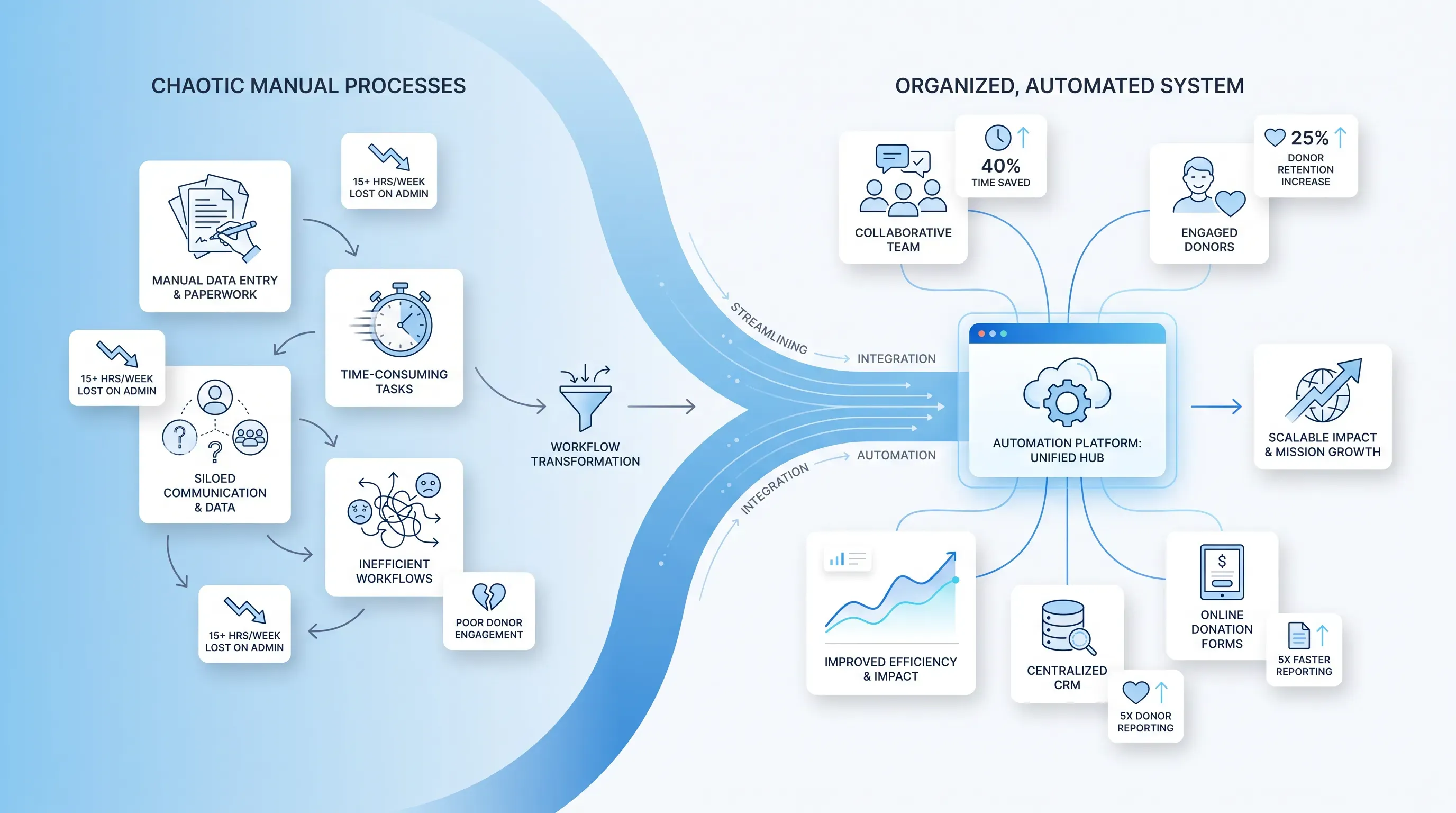
Infographic illustrating a nonprofit team's workflow transition from chaotic manual processes to an organized, automated system.

Teams get overwhelmed when they try to hand off everything at once. The first tasks to automate are the repetitive ones that eat hours and follow a predictable pattern. In this context, AI marketing automation software handles that scaffolding so your limited time goes to the genuine relationships only a person can build. Each job below is one you'll recognize from your own week.

Need help with your AI visibility?

Book a free consultation with our experts we'll help you determine exactly which services your organization needs.

Donor nurturing on autopilot

A supporter's journey from first gift to loyal giver runs on touchpoints, and tracking each one by hand across a growing list is where things slip. Triggered email sequences carry that load. A new donor enters a welcome series that introduces your mission over a few messages. A gift triggers a thank-you tied to the amount and type. And a supporter who hasn't given in a year drops into a re-engagement flow built to win them back.

This is the moves-management idea development officers already know, run automatically. It matters because the first three months decide whether a donor returns. Keela's analysis of Q3 2025 data found that Only 14% of new donors give a second time, and the fix is a fast thank-you and a real second touchpoint inside 90 days. That's exactly the consistency a two-person team can't hold by hand across hundreds of records. The sequence still feels personal to the donor because it references their name and their gift, even though no one hit send.

CRM integrations that connect your data

Automation earns its keep when it connects to the tools you already run. Linked to your CRM and donation forms, it keeps donor records and communications in one connected system instead of scattered across logins. The payoff is concrete. When a supporter makes a first-time gift, an integrated system generates a new donor record with the details needed for a personalized thank-you and logs the contribution across marketing and accounting at once. Matching-gift data flows between systems the same way, so you stop leaving that revenue on the table.

For a lean team, this means:

  • No more entering the same gift into three places, which cuts the errors that come with double entry

  • One reliable source of truth, so fundraising numbers and financial reports finally agree

Menus and toggles handle the setup, and nonprofit automation platforms like DonorPerfect ship with connectors to the common tools already built in. Where a connection is trickier, most vendors have a support team that sets it up for you.

Automated workflows for busy staff

Beyond email, automation removes the behind-the-scenes busywork that clogs a fundraising week. It can auto-assign a follow-up task to a gift officer when a major gift lands and update a donor record after someone takes an action. The work still happens. You just stop being the one who has to remember it.

Pre-built workflow templates lower the setup burden even further. Instead of building an appeal from a blank screen, you start from a template for a welcome series or a year-end campaign and adjust it to your voice. This protects the team during the busy stretches, like a December push or a grant crunch, when things slip through the cracks precisely because everyone is buried. The automation keeps the reminders and follow-ups moving while you focus on the asks that need a human.

Need help with your AI visibility?

Book a free consultation with our experts we'll help you determine exactly which services your organization needs.

Reporting without the manual pull

The late-night spreadsheet before a board meeting is one of the clearest wins here. Automated reporting in nonprofit automation platforms generates donor and revenue reports on a schedule, so the numbers are ready when you need them instead of assembled by hand at 11 p.m. That reclaims real time. Kleercard's 2026 analysis found that nonprofits that adopt this kind of automation report that they save 15 to 20 hours per week on administrative work.

The AI highlights trends worth acting on, like a dip in retention among mid-level donors or which segment is quietly giving the most. That turns raw rows into a decision a director can defend to the board. The stakes are real, since dedicated reporting tools produce reports 4.2 times faster than spreadsheets, per the Blackbaud Institute's 2025 census. When you answer to a board and to grant funders on a fixed calendar, having accurate reports ready on demand changes how the conversation goes.

Smarter supporter engagement and ai campaign management

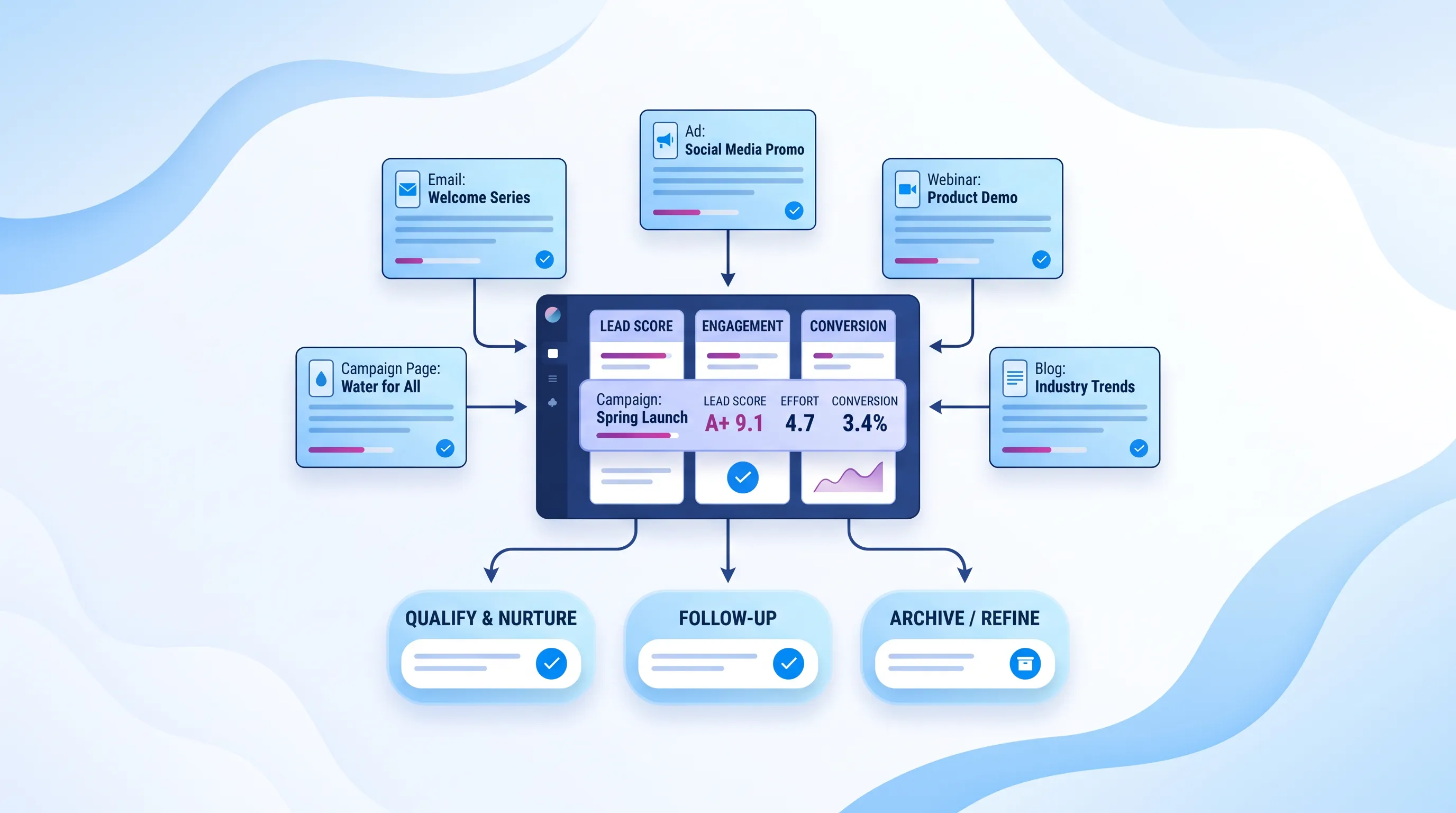
The individual tasks add up to something larger. Once the scaffolding runs itself, ai campaign management helps you engage supporters at a scale a small team could never reach manually, and run campaigns that sharpen over time instead of starting from zero each round.

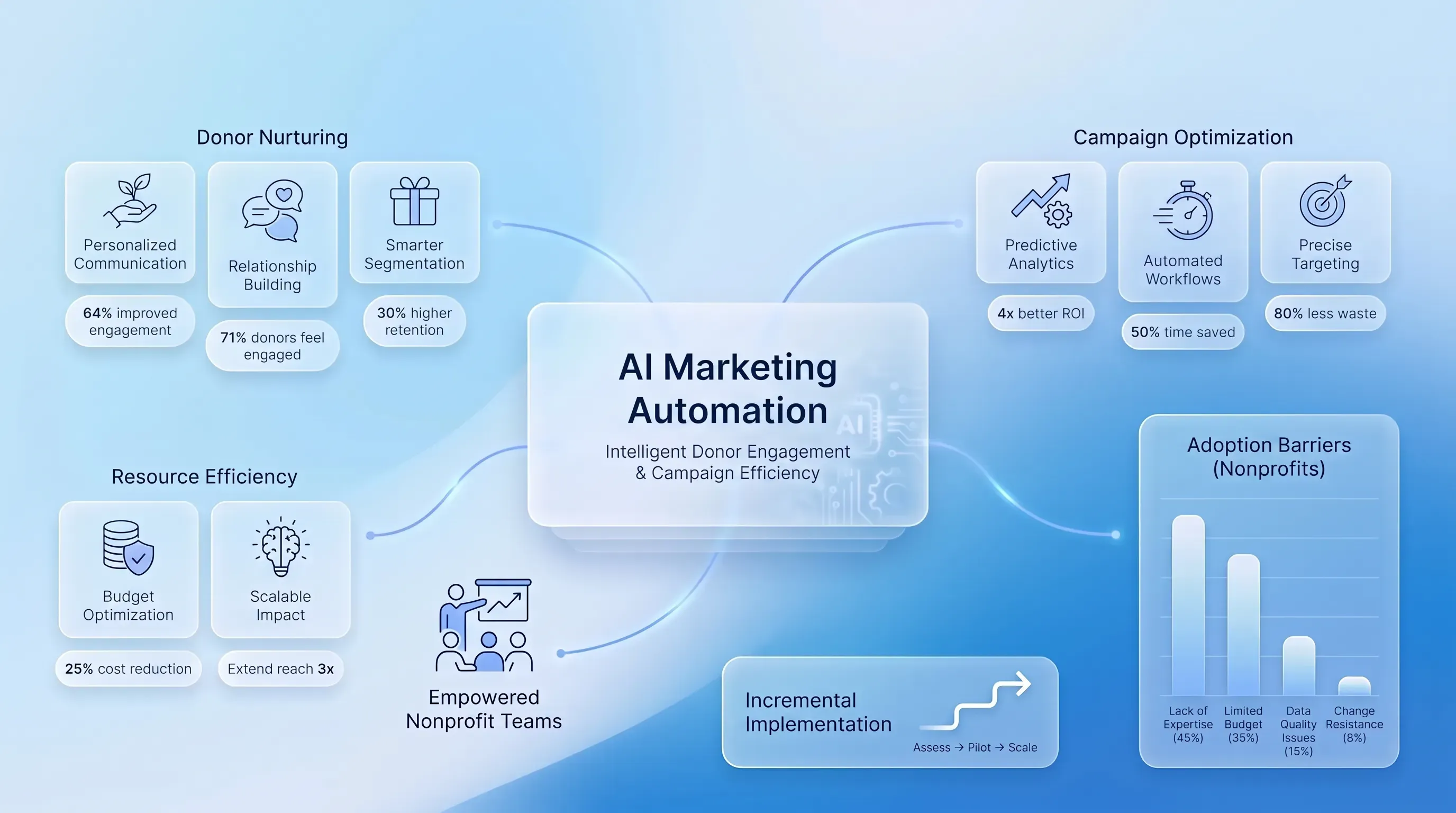
Segmentation is where the reach comes from. You group supporters by giving history or interests, then send each group a message that actually fits. An Abila study cited by Nonprofit Tech for Good found that 71% of donors feel more engaged when communications are personalized. AI-driven segmentation updates those groups in real time as behavior shifts, so a donor who lapses moves into the right flow without you rebuilding the list.

Then there's the optimization side. AI campaign management tools test the variables you'd otherwise guess at, like subject lines and send timing, then adjust future sends toward what works. Personalized send-time optimization alone can lift open rates from the 18 to 22% range up to 28 to 35%, because the email lands when each person actually checks their inbox. The value of AI campaign management is that the software keeps learning across campaigns, so your outreach gets both broader and sharper after every send. That compounding is the operational win, and it's why AI campaign management belongs in the toolkit of a team that can't afford to run every test by hand.

Adopting automation without burning out your team

The honest fear is that new AI marketing automation software becomes another job nobody has time for. That fear is grounded in reality, since Taproot reports that over a quarter of nonprofit leaders cite lack of staff training as a top barrier to AI adoption and that training gets just 1% of nonprofit technology budgets. The goal is to start small and let early wins build confidence.

A staged rollout keeps the team steady. Here's a sequence that works:

  1. Pick one or two high-value workflows first, like the new-donor welcome series and automatic thank-yous, since those deliver visible results fast.

  2. Manage cost through nonprofit programs before paying full price. TechSoup connects nonprofits to software at up to 90% off, and eligible organizations qualify for $10,000 a month in free Google Ad Grants.

  3. Use templates and vendor support so setup stays manageable.

The two barriers that stop most teams, limited expertise and limited time, both shrink when you narrow the scope. You don't need a tech hire to switch on a welcome sequence built from a template. And you don't need a free month to launch one workflow. Once that first automation is quietly running and saving hours, adding the next one feels like relief instead of risk.

Doing more with the team you have

At its best, AI marketing automation software lets a lean, mission-driven team act with the consistency and reach of a much larger one. The repetitive scaffolding runs on its own, which frees your hours for the work only people can do, like the personal call to a major donor or the story that moves a board. The technology handles the tracking while your team protects the relationships.

Start by auditing which repetitive task costs your team the most hours, then automate that one first. If you want a partner to map that first workflow and choose AI marketing automation software that fits a small nonprofit budget, reach out to our team for a walkthrough.
Need help with your AI visibility?

Book a free consultation with our experts we'll help you determine exactly which services your organization needs.

Clean donor names, email addresses, consent status, gift dates, and duplicate records first. Automation depends on accurate fields, so bad data leads to wrong segments and poorly timed messages. Start with the fields used in your first workflow, then expand cleanup as you add more automations.

Protect donor privacy by choosing tools with role-based access, encryption, audit logs, and clear data processing terms. Limit the data you send into AI features to what the workflow needs. Review opt-out settings, consent records, and vendor policies before you connect donor records.

Automation can’t replace personal donor outreach. It handles reminders, thank-yous, and segmentation so staff can spend more time on calls, meetings, and high-value conversations. Use automation for repeatable communication, then route major gifts or sensitive donor issues to a person.

Upgrade when manual list building, timed follow-ups, and campaign reporting take hours each week. Basic email tools work for newsletters, but ai marketing automation software is better when donor behavior should trigger different messages. The switch makes sense once staff can’t keep up with follow-up by hand.

Measure the first workflow against a baseline before launch. Track thank-you speed, second-gift rate, email engagement, and staff hours saved. If Snoika Foundation is helping with setup, ask the team to document those metrics before automation starts, then compare results after 30 or 60 days.

Book a Demo

Book a time that works best for you

You Might Also Like

Discover more insights and articles

An airy infographic featuring a central 'Trust' card surrounded by translucent strategy steps, metrics, and icons on a blue gradient background.

Nonprofit Brand Strategy: A Step-by-Step Framework for Building Trust

This article lays out a reusable framework for defining what your organization stands for and proving your claims with evidence. It covers research through measurement.

Calm infographic showcasing 'Tailored AI Training for Nonprofit Staff' with role-specific cards and best practices in a clean layout.

AI Training for Nonprofits: A Practical Curriculum for Teams

This article lays out a curriculum for turning scattered AI experiments across your staff into shared, documented practice. It covers how to assess skills and risks and design role-specific learning.

Infographic illustrating the nonprofit donor journey with rounded cards for each stage, set against a light blue to white gradient background.

Donor Journey Mapping for Nonprofits: From First Contact to Long-Term Support

This article gives you a practical framework for donor journey mapping, from the moment someone discovers your cause through recurring support and advocacy. You will learn how to pick a priority persona and map each stage of the nonprofit donor journey. The finished map then becomes a guide for coordinated fixes across your website and email, with search and campaigns folded into the same effort.

A light blue infographic featuring a central translucent card labeled 'AI Policy for Nonprofits' with branching flowcharts and stakeholder silhouettes.

AI Policy for Nonprofits: A Practical Governance Template

This article walks you through building an AI policy for nonprofits based on what your staff already do. You'll get plain-language principles and use boundaries, with safeguards built into a copy-ready template and an implementation checklist you can adapt this week.