AI Training for Nonprofits: A Practical Curriculum for Teams

Content authorArtem LozinskyPublished onReading time10 min read
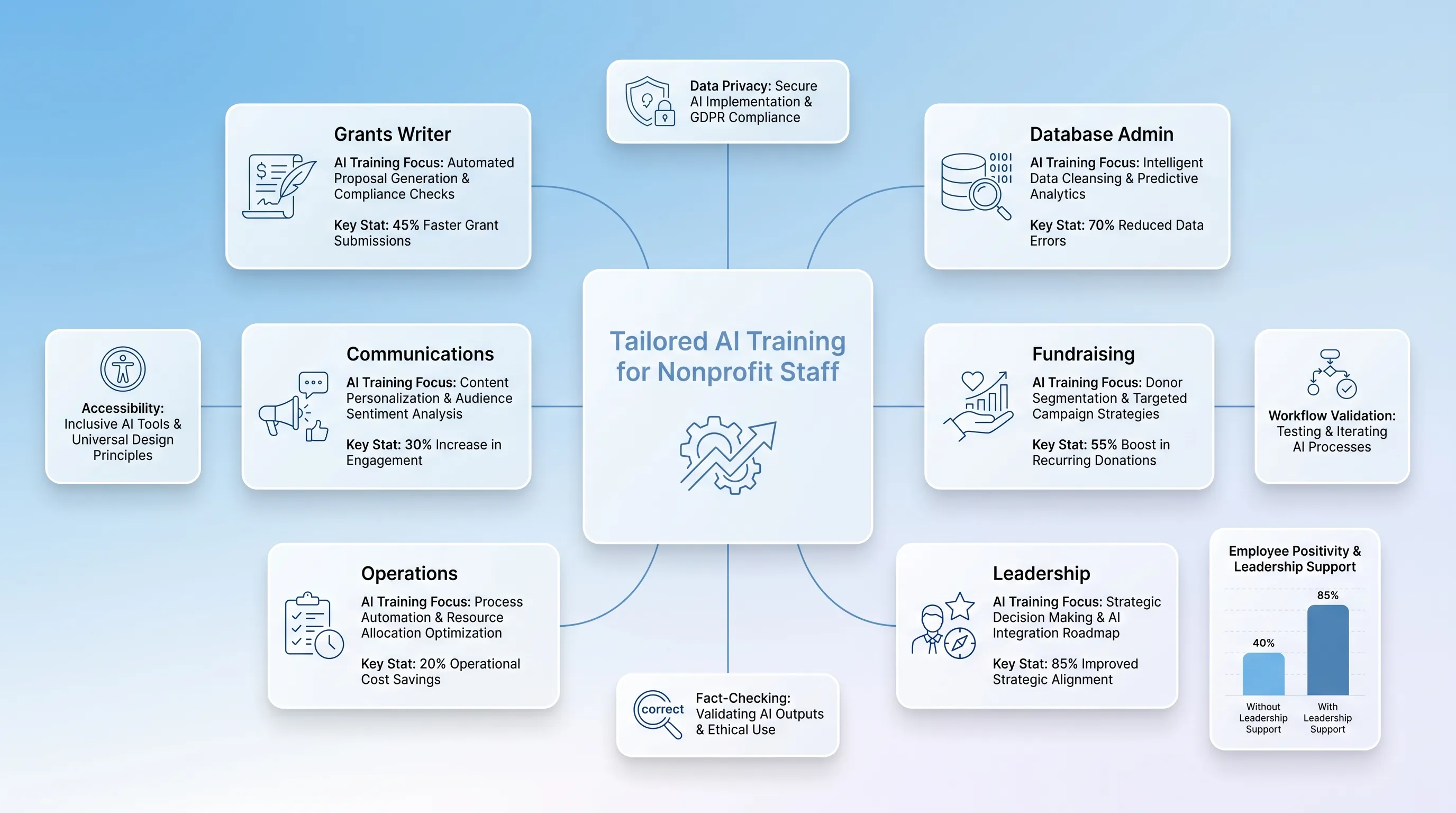
Calm infographic showcasing 'Tailored AI Training for Nonprofit Staff' with role-specific cards and best practices in a clean layout.

This article lays out a curriculum for turning scattered AI experiments across your staff into shared, documented practice. It covers how to assess skills and risks and design role-specific learning.

Why shared training matters

Most AI training for nonprofits amounts to a one-hour tool demonstration, and the results show it. Adoption is nearly universal without being useful: 92% of nonprofits use AI in some capacity, yet only 7% report major improvements in what their organization can accomplish.

Gabe Cooper, CEO and founder of the nonprofit CRM company Virtuous, described the pattern bluntly in the report's release: "one person using ChatGPT to help draft an appeal, while the rest of the team is still buried in manual processes and disconnected systems. That's not a strategy. It's a workaround."

AI training for nonprofits fixes that only when it's treated as coordinated change rather than a tutorial. Shared instruction gives everyone the same vocabulary for risk and the same expectation that a human signs off before anything reaches the public.

Assess skills and risks

Start by finding out what's already happening, because something is. Ask each team which tools they've used in the past 30 days and whether they used free personal accounts before you plan ChatGPT training for nonprofits. That last part matters: 82% of pastes of company data into AI tools come from personal, unmanaged accounts, according to LayerX's 2025 enterprise data security research.

Your inventory needs five things on paper before you design a single session:

  • Current tool use by team, split between organization-managed accounts and personal ones

  • Self-rated confidence, which tells you where fear lives, not just where skill lives

  • The two or three workflows each team would most like to speed up

  • Every category of sensitive information you hold, from donor giving history to client case notes

  • Whether a written policy exists, and if so, whether anyone has read it

On that last point, expect a gap. 47% of nonprofits have no formal AI governance policy, and Amy Sample Ward, CEO of the nonprofit technology organization NTEN, argues the problem starts earlier than that. "A lot of nonprofits actually don't have any of those policies," she told the Chronicle of Philanthropy about data collection and retention rules. "They've not done the work to kind of be ready to then do this work."

Use the findings to sort people into three levels. Foundational means you understand what a language model does and what it must never touch. Practitioner means you can build and refine prompts for your own recurring work and catch errors in the output. Steward means you own a workflow and answer for what goes wrong.

Plan AI training for nonprofits

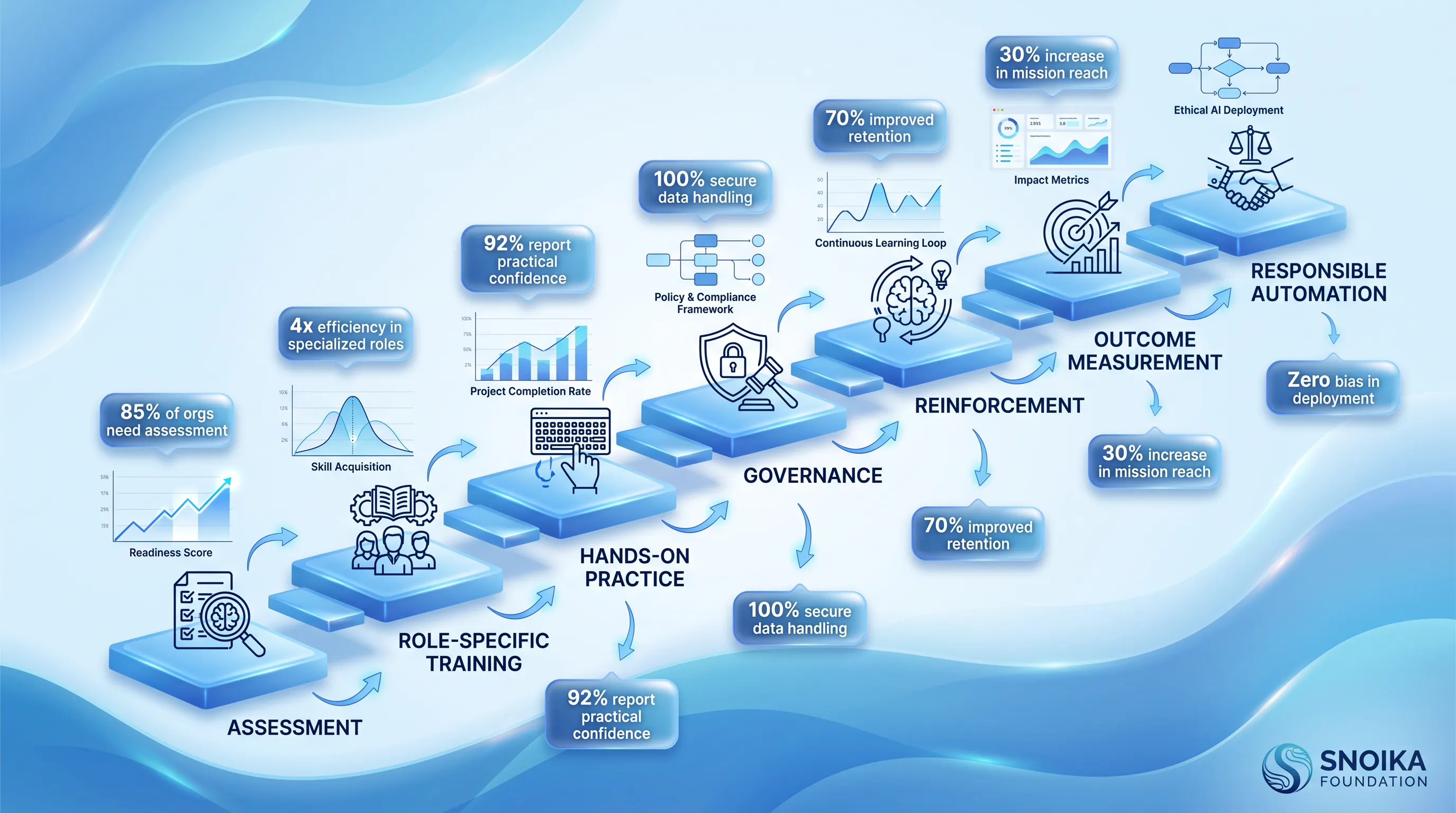
Infographic depicting a structured AI training curriculum for nonprofits, featuring a cool blue gradient and multi-tiered pathway with icons.

In AI training for nonprofits, identical instruction for everyone wastes the time of the people who need it most. A grants writer and a database administrator face different failure modes, so the learning outcomes should differ too. Effective AI training for nonprofits maps each competency to a task the person already owns.

Depth matters more than breadth here. Boston Consulting Group surveyed 10,635 employees across 11 countries and found that 79% of those who received more than five hours of training became regular AI users, compared with 67% of those who got less. Five hours is your floor.

Keep every example drawn from work your staff recognize. In ChatGPT training for nonprofits, staff need to know what happens when they paste a case note into a chat window.

Need help with your AI visibility?

Book a free consultation with our experts we'll help you determine exactly which services your organization needs.

Communications teams

Start where the sector already is. The most common uses of AI chatbots among nonprofit communicators are checking grammar and spelling (53%) and brainstorming headlines and subject lines, with first drafts of content close behind, which gives ChatGPT training for nonprofits a place to begin. Build on that instead of pretending it isn't happening.

Teach brand voice as a document. A page of your own published sentences, pasted into the prompt as reference material, produces better results than any adjective. Accessibility belongs in the same session, since WCAG 2.2 Level AA is the practical standard in ADA litigation for public-facing organizations and AI drafts don't produce useful alt text on their own.

Fact-checking deserves the last third of the session. Every statistic and name in an 1ЙЫ draft gets verified against a primary source before it ships. Human review is a step in the workflow with a name attached.

Fundraising teams

Fundraisers hold your most sensitive records, and donors have opinions about it. In Cherian Koshy's 2024 survey of 1,006 US donors, 31.4% said AI use would make them less likely to give, while 43.3% expected a positive or neutral effect. That split is the reason AI training for nonprofits is about restraint as much as capability.

The rule is simple and absolute: no personally identifiable donor information goes into a tool your organization hasn't approved and contracted. Teach staff to write appeals from anonymized segment descriptions rather than pasted records. Prospect research means using AI to summarize public filings and news coverage, then checking what it produced.

Grant work needs its own caution. Candid's survey of 527 US foundations found only 10% accept or plan to accept applications with generative AI content. Another 23% will not, while 67% remain undecided. Answer honestly when a funder asks.

Operations teams

Operations gets the safest, highest-yield work: meeting summaries and document analysis. This is also where a nonprofit AI workshop can show measurable time savings fastest, because the tasks recur weekly and the inputs are internal.

Validation steps have to be concrete. A meeting summary gets checked against the recording by whoever ran the meeting. A contract summary never substitutes for reading the clause that costs money. Set an escalation rule in writing: when output touches finance or legal terms, it goes to a named person before anyone acts on it.

Low-risk automation means one step, reversible, with a human trigger. Anything that writes to your CRM or sends mail without review is not low-risk, whatever the vendor demo suggests.

Leadership teams

Leaders set the ceiling on adoption whether they intend to or not. BCG found the share of employees who feel positive about generative AI rises from 15% to 55% when leaders actively champion and model its use, and just 25% of frontline workers say their leaders give enough guidance.

So the leadership session is about approving use cases and assigning an owner to each one. The vendor questions that matter are where our data goes and what happens when we leave. Cybersecurity belongs here too, since 63% of organizations in IBM's 2025 breach research lacked governance policies to manage AI or prevent shadow AI risk.

Staff concerns need a real answer. Say plainly what AI will and won't change about roles, and put it in writing.

Need help with your AI visibility?

Book a free consultation with our experts we'll help you determine exactly which services your organization needs.

Teach safe AI use

This is the module that protects you, so it gets the most hands-on time in any nonprofit AI workshop. Prompt structure comes first because it's the cheapest fix: give the model a role and the actual source material.

Then teach the failure modes with numbers. Stanford researchers testing legal AI tools in May 2024 measured hallucination rates of 17% for Lexis+ AI and 33% for Westlaw's AI-Assisted Research. The GPT-4 rate was 43%, and those errors included real citations attached to the wrong authority. Bias is documented too: a systematic test of résumé screening found 85.1% of cases favored résumés with white-sounding names over identical résumés with Black-sounding names.

Copyright rules are settled enough to teach. The US Copyright Office concluded in January 2025 that prompts alone don't give a user authorship of an AI output, which means your fully AI-generated campaign image isn't yours to protect.

Draw the line explicitly. AI assists with drafting and summarizing. AI never decides who receives services or whether a candidate advances. A person's name attaches to every one of those.

Build the workshop

Design it modular so you can run four hours or two days of AI training for nonprofits on the same skeleton. Everyone attends the shared blocks on literacy and safety. Then teams split for practice on their own material, which is the part that actually transfers.

Bring real artifacts into the room. A past appeal letter and a redacted case note. ChatGPT training for nonprofits fails when the exercises use invented scenarios, because staff correctly conclude the lesson doesn't apply to their Tuesday.

Nonprofit AI workshop agenda

Six sessions, each ending in a discussion break rather than a slide about next steps:

  1. AI literacy: what a language model predicts, why it sounds confident, and what your organization has decided about disclosure

  2. Safe prompting: structure, source material, iteration, and knowing when to abandon a prompt

  3. Data protection: your classification tiers, approved tools, and the specific inputs that are never permitted

  4. Output review: verification against primary sources, bias checks, and the approval chain by content type

  5. Responsible automation: what qualifies as low-risk, how to test in a sandbox, and how to reverse a mistake

  6. Governance: policy walkthrough, incident reporting, and who owns which decision

Reserve the final 45 minutes for each team to commit to one workflow they'll change before the next check-in. Written down, with a name and a date.

Hands-on team exercises

Exercises should produce artifacts you keep. Prompt improvement works well as a paired activity: one person writes a vague prompt and the pair rewrites it with a role and source.

Both versions go into a shared prompt library:

  • Hallucination detection: hand out an AI-generated paragraph about your own program area, seeded with two plausible errors, and time how long verification takes

  • Donor-data redaction: take a real record and rewrite it as an anonymized segment description suitable for drafting an appeal

  • Content review: run a draft through your accessibility and brand-voice checklist and log every change needed

  • Workflow mapping: chart one recurring task end to end, then mark each step as human-only, AI-assisted, or automatable

  • Automation risk assessment: score a proposed automation on reversibility and who gets harmed if it fails silently

The mapping exercise surprises people. Teams discover the slow step is waiting for an approval nobody owns.

Measure training results

Tool usage dashboards tell you nothing, which is why outcome tracking in the sector is rare. Take a baseline before the workshop and measure again at 30 and 90 days. Without the baseline you'll have anecdotes.

Track participation and completed hours against that five-hour threshold. Track competency by having people demonstrate a task. Then watch active use inside the workflows you mapped and time saved on those specific tasks.

Policy compliance and reported incidents belong on the same dashboard. A rising incident count in the first quarter after AI training for nonprofits is a good sign, because it means people recognize and report problems instead of hiding them.

Plan for decay. Without reinforcement, roughly 70% of new information is forgotten within a day and up to 90% within a week, a pattern Hermann Ebbinghaus first mapped in 1885. That's an argument for spaced follow-up.

Sustain responsible adoption

A nonprofit AI workshop is a starting point. Publish the policy and hold monthly office hours where people bring their actual stuck prompts. Train two or three peer champions deeply so colleagues have someone nearby to ask, and revisit your mapped workflows every quarter, since the tools change faster than your documentation does.

Snoika Foundation works with nonprofits and NGOs on AI visibility and runs AI training for nonprofits and workshops for mission-driven teams. If you want help designing AI training for nonprofits that fits your staff and your risk tolerance, book a call with us.
Need help with your AI visibility?

Book a free consultation with our experts we'll help you determine exactly which services your organization needs.

Plan for at least five hours of instruction, then add follow-up practice. The curriculum can run as a four-hour workshop or a two-day program, but staff need enough time to apply rules to their own work. Check progress again after 30 and 90 days.

Create an inventory of current tool use, including personal accounts used for work. Record each team's priority workflows, confidence level, sensitive data categories, and policy awareness. This baseline lets you tailor exercises and measure whether the training changes day-to-day work.

Staff shouldn't paste personally identifiable donor information into an AI tool unless the organization has approved and contracted for that use. Use anonymized segment descriptions when drafting appeals. Keep donor names, giving history, contact details, and other identifying records out of unapproved tools.

A named person should verify every fact, statistic, and citation against a primary source before publication. For public content, reviewers should also check brand voice and accessibility requirements. For finance or legal terms, the person responsible for that area must review the original document before anyone acts.

Snoika Foundation works with nonprofits and NGOs on AI visibility, AI training for nonprofits, and workshops for mission-driven teams. Its training can be designed around staff roles, existing workflows, and the organization's risk tolerance. Teams should still set their own policy, approval process, and data-handling rules.

Book a Demo

Book a time that works best for you

You Might Also Like

Discover more insights and articles

An airy infographic featuring a central 'Trust' card surrounded by translucent strategy steps, metrics, and icons on a blue gradient background.

Nonprofit Brand Strategy: A Step-by-Step Framework for Building Trust

This article lays out a reusable framework for defining what your organization stands for and proving your claims with evidence. It covers research through measurement.

Infographic illustrating the nonprofit donor journey with rounded cards for each stage, set against a light blue to white gradient background.

Donor Journey Mapping for Nonprofits: From First Contact to Long-Term Support

This article gives you a practical framework for donor journey mapping, from the moment someone discovers your cause through recurring support and advocacy. You will learn how to pick a priority persona and map each stage of the nonprofit donor journey. The finished map then becomes a guide for coordinated fixes across your website and email, with search and campaigns folded into the same effort.

A light blue infographic featuring a central translucent card labeled 'AI Policy for Nonprofits' with branching flowcharts and stakeholder silhouettes.

AI Policy for Nonprofits: A Practical Governance Template

This article walks you through building an AI policy for nonprofits based on what your staff already do. You'll get plain-language principles and use boundaries, with safeguards built into a copy-ready template and an implementation checklist you can adapt this week.

A layered SaaS infographic featuring a central translucent card showing the nonprofit logo design process, surrounded by mini-cards for key phases.

Nonprofit Logo Design: How to Create a Trustworthy Mission-Driven Logo

This article walks a small or newly formed nonprofit through nonprofit logo design without an in-house designer. It explains how to build the brief and choose a design direction, then takes the team through the remaining design process.