Robots.txt for AI Crawlers: How to Control Access Without Blocking Search

Content authorArtem LozinskyPublished onReading time13 min read
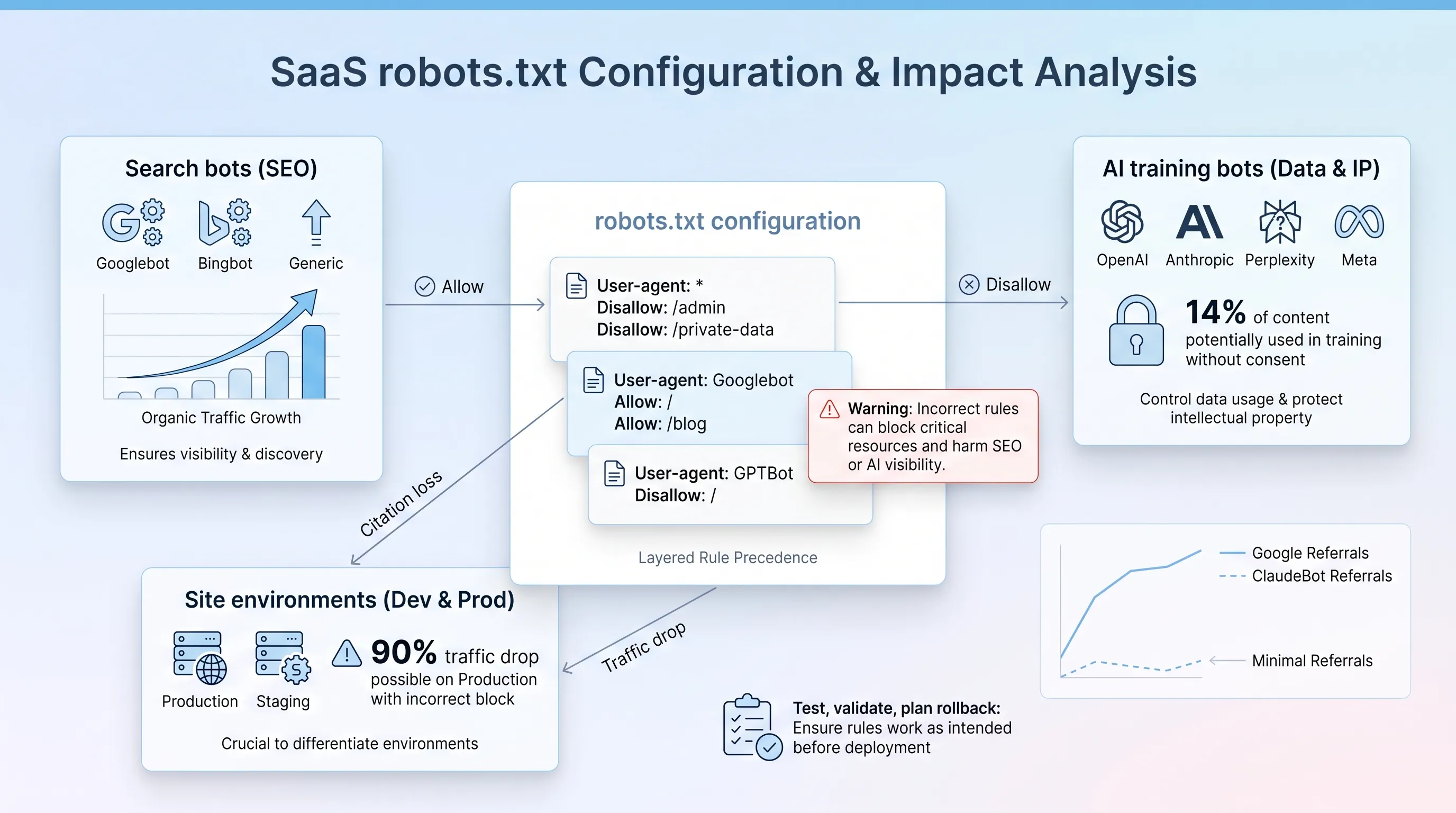
Calm SaaS infographic featuring a central card for 'robots.txt configuration' and three surrounding cards for search and AI bots, with charts and annotations.

This article walks through configuring and testing robots txt for AI crawlers without cutting off Googlebot or Bingbot. It covers crawler classification by purpose and the testing steps that catch a sitewide block before it reaches users.

Why this file suddenly carries more weight

Writing robots txt for AI crawlers used to be a footnote in a technical audit. Now it's the line where AI visibility and organic traffic meet in one plain text file that anyone can read at your domain root. One misplaced Disallow: / and months of work vanish from the index.

The pressure is real. Cloudflare found that among the top 10,000 domains with a readable robots.txt, about 14% had directives aimed specifically at AI bots as of June 2025 using AI bot robots.txt. Most of those were blocks. And most were written fast, under pressure from legal or leadership, by people who weren't given time to check what each user-agent actually does.

That's the problem this guide on robots txt for AI crawlers solves. The task is to write rules that say exactly what you mean.

What robots.txt controls

The file works through groups. You name a crawler with User-agent, then give it Allow and Disallow rules that match URL paths. A crawler reads the group that matches its own token and applies the most specific matching rule. That last part matters more than most people realize, because the longest-match rule decides which directive wins when Allow and Disallow both apply to the same URL.

Google supports the user-agent and allow fields, and it also supports disallow and sitemap. Everything else gets ignored. Google retired support for noindex inside robots.txt on September 1, 2019, and crawl-delay was never honored by Googlebot at all, though Bing still reads it. Google also enforces a 500 kibibyte limit and ignores anything past that point, which becomes a live risk on enterprise sites with thousands of URL-level rules.

Three things robots.txt is not:

  • Authentication. The file is public, and listing Disallow: /internal-pricing/ tells the world that path exists.

  • A reliable indexing control. Google states plainly that a disallowed URL can still be indexed if other sites link to it, which appears in results without a description.

  • Enforcement. Compliance is voluntary. In August 2025, Cloudflare reported that Perplexity used undeclared crawlers that posed as Chrome on macOS and generated 3 to 6 million daily requests across tens of thousands of domains after its declared bots hit robots.txt restrictions.

Hold onto that third point. It shapes everything that follows about where robots txt for AI crawlers belongs in your stack and where it doesn't.

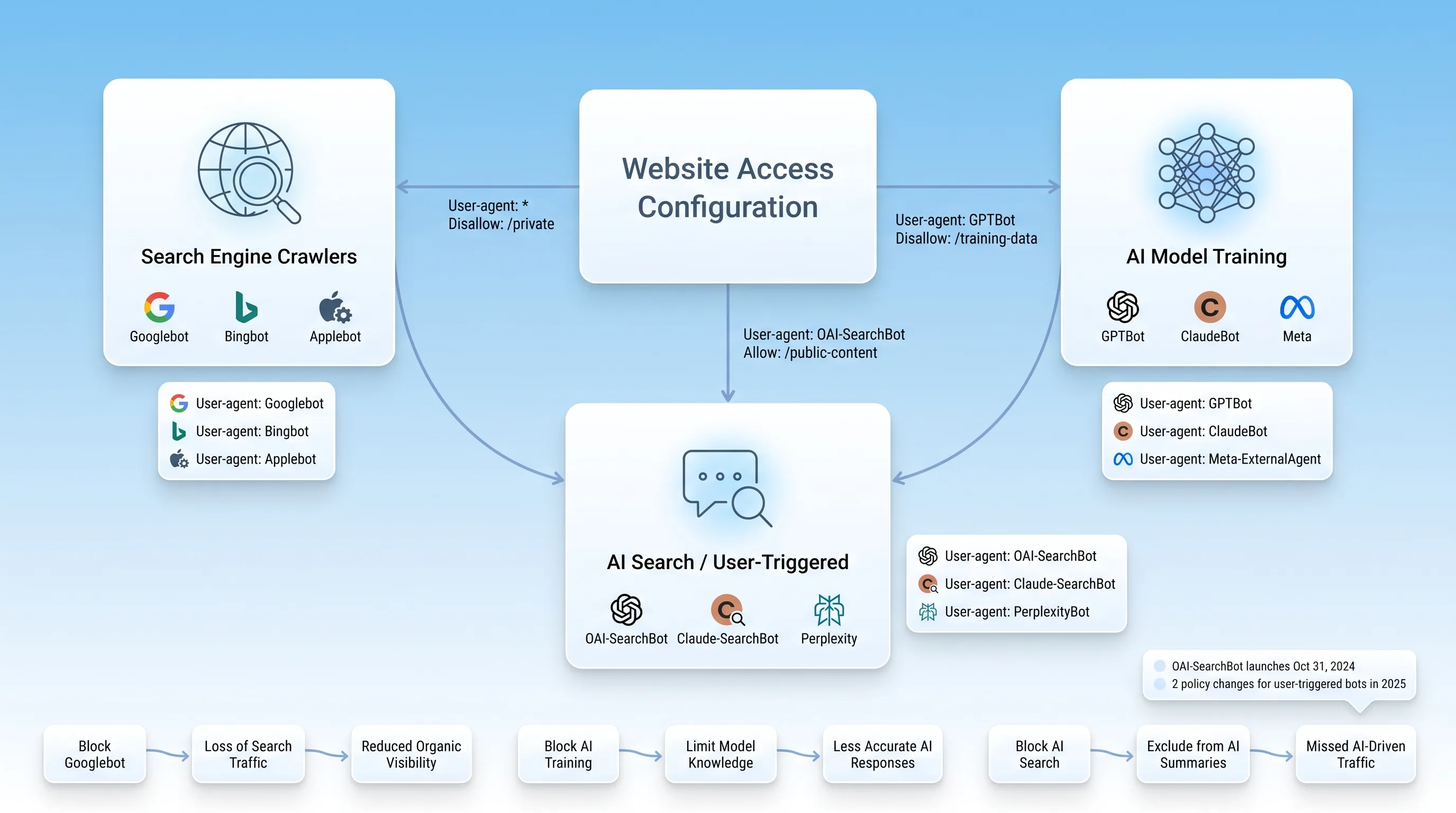
Treating "AI bots" as one category is where most robots txt for AI crawlers go wrong. A single crawler operator runs three or four separate agents with completely different jobs, and the robots.txt rules for each are independent of the others. OpenAI says so directly in its own documentation: you can allow OAI-SearchBot while disallowing GPTBot. This means permitting visibility in ChatGPT search without signalling permission for training.

So the useful question is "what does this specific agent do with what it fetches, and do I want that?" Four functions cover almost everything you'll encounter.

Separate crawler purposes

Calm SaaS infographic with a gradient background, central card on website access, and clusters for search engines, AI training, and user-triggered bots.

Traditional search indexing

Googlebot and Bingbot feed conventional search results. Blocking either one is a decision to stop receiving organic traffic from that engine, and there is no version of that trade worth making for a commercial site. The same applies to the resource files those crawlers need.

Blocking /css/ or /js/ was standard advice a decade ago and it's actively harmful now. Google's own guidance is direct: if your robots.txt disallows crawling of these assets, it directly harms how well its algorithms render and index your content, which can result in suboptimal rankings. Googlebot downloads stylesheets and scripts to render a page the way a person sees it. Block them and Google evaluates a broken version of your site.

Need help with your AI visibility?

Book a free consultation with our experts we'll help you determine exactly which services your organization needs.

AI model training

Training crawlers collect pages that feed future model versions. GPTBot is OpenAI's and ClaudeBot is Anthropic's. Blocking these is a licensing decision rather than a traffic decision, because none of them influence search rankings.

Google's approach here is worth understanding because it's structurally different. Google-Extended isn't a crawler at all. It has no user-agent string of its own and no separate HTTP request. It's a product token in robots txt for AI crawlers that controls whether content Googlebot already fetched can be used for Gemini training and grounding, and Google states it does not affect inclusion in Google Search and isn't used as a ranking signal. Apple runs a similar token, Applebot-Extended, alongside its regular Applebot crawler.

Verify every token against the vendor's current documentation before you write it into a file. Anthropic previously operated under Claude-Web and anthropic-ai, both now deprecated. Rules copied from a 2023 blog post are addressing agents that no longer exist.

Set AI crawler access

Search-oriented AI crawlers are a separate tier, and confusing them with training bots is the single most expensive mistake in this whole exercise. OAI-SearchBot feeds ChatGPT's search feature, which launched October 31, 2024. Claude-SearchBot indexes content for Claude's search results. PerplexityBot builds Perplexity's answer index, and Perplexity states that content it crawls is not used to pre-train foundation models.

Anthropic spells out the consequence in its updated crawler documentation. Blocking Claude-SearchBot, the company wrote, "prevents our system from indexing your content for search optimization, which may reduce your site's visibility and accuracy in user search results." That's the vendor telling you what it costs. When you set AI crawler access at this tier, you're deciding whether your brand can be cited in answers people are already reading instead of clicking through to find.

User-triggered retrieval

The fourth tier behaves differently, and the differences aren't consistent across vendors. ChatGPT-User and Claude-User both fetch a page because a human asked about it in that moment. There's no persistent crawl and no index being built.

Anthropic says all three of its bots honor AI bot robots.txt, a group including Claude-User. Perplexity draws the opposite line. Its documentation states that because Perplexity-User acts on direct user requests, it generally ignores robots.txt rules. Meta says its Meta-ExternalFetcher bypasses robots.txt too. OpenAI narrowed its own wording to cover OAI-SearchBot and GPTBot specifically, which leaves ChatGPT-User outside that framework.

If a legal or security review concludes that blocking the training bot means the vendor can't retrieve your content, that conclusion is wrong. Check the current platform documentation for every agent in this tier, because the policies changed twice in 2025 alone.

Audit current rules

Before changing anything, find out what you're actually running. Fetch the live file at the root of every host you care about, on both www and non-www over HTTP and HTTPS. Rules apply only to the exact host and protocol where the file sits, which is why a correct file on example.com does nothing for shop.example.com.

One Search Console user documented exactly this failure with robots txt for AI crawlers in February 2026: Google had fetched multiple robots.txt files across URL variants, and some contained Disallow: / while another was correct. The fix was unifying the variants behind a single 301 redirect.

Work through the file in this order:

  1. Inventory every rule group and write down which user-agent token each one addresses.

  2. Map each token to one of the four functions above and mark any you can't identify in current vendor documentation.

  3. Check where your wildcard group sits. A User-agent: * group with restrictive rules is ignored entirely by any crawler that has its own named group, so a bot you meant to restrict through the wildcard walks straight past it.

  4. Test your path patterns. Paths are case-sensitive, so Disallow: /Reports/ leaves /reports/ wide open.

  5. Delete duplicate groups for the same token and any rule touching CSS or JavaScript.

That last item deserves a second pass. Blocked rendering resources rarely produce an obvious symptom, so they survive audits for years while quietly degrading how Google understands your pages.

Need help with your AI visibility?

Book a free consultation with our experts we'll help you determine exactly which services your organization needs.

Compare site environments

Production and staging need opposite policies, which is precisely why they collide. Staging should be invisible. Production should be open to search crawlers with selective rules for everything else. The failure mode is a deployment that carries the staging file into the live environment, and it happens more than anyone admits. Search Engine Land describes an ecommerce team whose organic traffic dropped 90% within 24 hours after a routine Thursday push brought two lines of staging robots.txt to production.

The deeper problem is that robots.txt was never adequate protection for staging in the first place. John Mueller of Google recommends blocking access server-side instead, either through HTTP authentication or IP allowlisting, and he explains why robots.txt falls short: you need to remember to change it when moving from staging to production, which is another source of common problems, and URLs blocked this way can still get indexed without their content.

Put authentication in front of staging and the robots txt for AI crawlers question resolves itself. Then add a deployment check that fails the build if a production file contains a sitewide disallow. It's a few lines of shell script against a mistake that costs quarters of recovery.

Robots txt for AI crawlers

Now to the configuration itself. The approach that holds up is selective rather than categorical, and it starts from a position of openness that you narrow deliberately. Writing robots txt for AI crawlers works when each group answers a question you've actually asked.

Keep Googlebot and Bingbot fully accessible. That's the floor, and nothing about AI policy justifies touching it. Then handle the AI bot robots.txt groups by function. Training bots get whatever your organization decided about licensing, and that decision belongs to legal and leadership rather than to whoever is editing the file. Search-oriented agents stay open unless you've accepted losing citation eligibility in ChatGPT and Perplexity.

For sensitive or low-value paths, disallow them by directory rather than URL by URL. Consolidating rules at the directory level keeps you clear of the 500 KiB ceiling and makes the file readable six months from now. But remember what a disallow is worth here. If a path holds customer data or internal pricing, robots.txt is the wrong tool and listing the path publishes a map to it. Use authentication.

A workable production file for a site that permits AI search but not training reads like this:

User-agent: *Allow: / User-agent: GPTBotDisallow: / User-agent: ClaudeBotDisallow: / User-agent: Google-ExtendedDisallow: / User-agent: OAI-SearchBotAllow: / User-agent: Claude-SearchBotAllow: / User-agent: PerplexityBotAllow: / Sitemap: https://example.com/sitemap.xml

Adjust the training decisions to match your policy. The structure is the point: named groups and no wildcard rule that quietly overrides your intent. Note that changes to search-related AI crawler access take time to register. OpenAI says robots.txt updates take about 24 hours to propagate through its systems, and Google caches the file for up to 24 hours as well.

Test before deployment

Syntax comes first. Run the file through a validator that applies the documented matching rules, then read it yourself, because a valid file can still be a wrong file. Google's open source robots.txt parser is the same library used in Search, and running it locally catches precedence errors in robots txt for AI crawlers that eyeballing the groups won't.

Then test at the URL level, once per named agent. Take your highest-value pages and check each one against every user-agent token in the file as well as the wildcard. The Search Console tester was retired in 2023, so the robots.txt report under Settings now shows fetch status and errors rather than letting you test a URL against a draft. Use the URL Inspection live test for Googlebot and a third-party validator for the AI bot robots.txt groups.

After deployment, verify the live file on every host and confirm the version Google fetched matches what you shipped. Then move to server logs. Log review is where AI bot robots.txt stops being theory, because you can see which agents actually arrived and whether a bot you disallowed kept coming anyway. Verify identity against published IP ranges rather than the user-agent string, since strings are trivially spoofed.

Keep watching for two weeks. Crawl stats and index coverage move on different clocks, and a blocked search bot shows up in coverage reports before it shows up in sessions.

Your rollback plan needs to be ready before you deploy:

  • Keep the previous file version in source control so restoring it is a single revert.

  • If a sitewide or high-value block goes live, restore first and diagnose afterward, then request a robots.txt recrawl in Search Console to shorten the cache window.

  • Set an alert on any production file containing Disallow: / under a wildcard group.

Access is not visibility

Here's the part that gets lost when the audit is finished and the file is clean. Permission only makes AI crawler access possible.

Allowing Googlebot doesn't guarantee indexing, and indexing doesn't guarantee ranking. Allowing OAI-SearchBot doesn't put you in ChatGPT answers, and being crawled doesn't make you citable. AI crawler access is a prerequisite you have to satisfy before any of the actual work counts, which is a different thing from being the reason a model quotes you.

The economics make this obvious. Cloudflare Radar data from the first quarter of 2026 shows ClaudeBot fetching roughly 23,951 pages per single referral, against a Googlebot baseline near 5:1. Enormous crawl volume, almost no traffic returned. Access was never the bottleneck for those sites.

What determines whether you get cited is content a model can extract cleanly and authority signals it can corroborate elsewhere. A permissive robots txt for AI crawlers removes an obstacle. Removing an obstacle is not the same as arriving.

Get an expert review

Snoika Foundation works on AI search visibility for B2B SaaS companies and digital products so they get found and cited across ChatGPT and Perplexity. That work starts with the technical layer of robots txt for AI crawlers, because a crawler that can't reach your pages can't recommend them either.

If you want a second set of eyes on your robots txt for AI crawlers before it ships, book a call with our team for a file audit and an implementation review that protects your organic search traffic.
Need help with your AI visibility?

Book a free consultation with our experts we'll help you determine exactly which services your organization needs.

Google temporarily stops crawling when robots.txt returns a 5xx server error because it can't determine the site's rules. It retries the file, then can use a previously cached version for up to 30 days. Monitor the root URL so an outage doesn't become a crawl interruption.

Create a named user-agent group and disallow the PDF path pattern used on your site. For example, `Disallow: /reports/.pdf` blocks that directory's PDFs for crawlers that support wildcard matching. Test a representative PDF and an HTML page afterward to confirm the rule stays limited.

Use an X-Robots-Tag when you need to prevent indexing of a file that search engines can still crawl, such as a PDF or image. Send `X-Robots-Tag: noindex` in the HTTP response, and don't block that URL in robots.txt, since crawlers must fetch it to see the tag.

No. A robots.txt file applies only to the exact protocol, host, and port where it is served. Rules at `https://example.com/robots.txt` don't control `https://help.example.com/`. Put a separate file at each subdomain's root and verify the live URL after deployment.

Snoika Foundation can review robots txt for ai crawlers by mapping each named agent to its purpose, checking rule precedence, and testing high-value URLs against the proposed file. A review should also compare the production file with staging controls and confirm Googlebot and Bingbot remain accessible.

Book a Demo

Book a time that works best for you

You Might Also Like

Discover more insights and articles

Infographic with a glassmorphism style, featuring a 9-step process in three rows, with elegant blue-and-white icons and flowing connections.

How to Build AI-Ready Program Pages That Convert

This article explains how to rebuild a programme page as an AI-ready program page structure so that a prospective participant and a language model can work out in seconds what you do and whether it applies to them. It walks through a nine-block architecture and a publishing workflow you can run with a small team.

Modern infographic with soft blue gradient background, featuring four circular glassmorphism cards connected by subtle lines and icons.

Nonprofit Call to Action Examples for Donations, Volunteers, and Advocacy

This article is a working swipe file of nonprofit call to action examples you can adapt for donations and volunteer recruitment. It covers copy formulas and a simple testing method so you can replace vague asks with ones that actually get completed.

Modern B2B technology infographic with frosted-glass cards, soft blue gradient, and elegant connections, centered on "Brand Guidelines.

Nonprofit Brand Identity: How to Build a Consistent System Beyond the Logo

This article explains how to build a nonprofit brand identity that survives contact with reality: twelve staff members and no in-house design team. It covers the visual and verbal systems behind that consistency, plus the templates and governance that keep the whole thing alive after launch.

Flat design infographic comparing two donation website types: 'Visit-to-Donation Rate' on the left and 'Start-to-Completion Rate' on the right, with arrows i…

Donation Page Conversion Rate: Formula, Benchmarks, and Diagnostics

This article explains how to calculate and benchmark a donation page conversion rate without mixing up denominators. It walks through two formulas with worked numbers and a repeatable diagnostic sequence you can run before you change anything on the page.